Voice Recorder Audio Memos2.3
Publisher Description

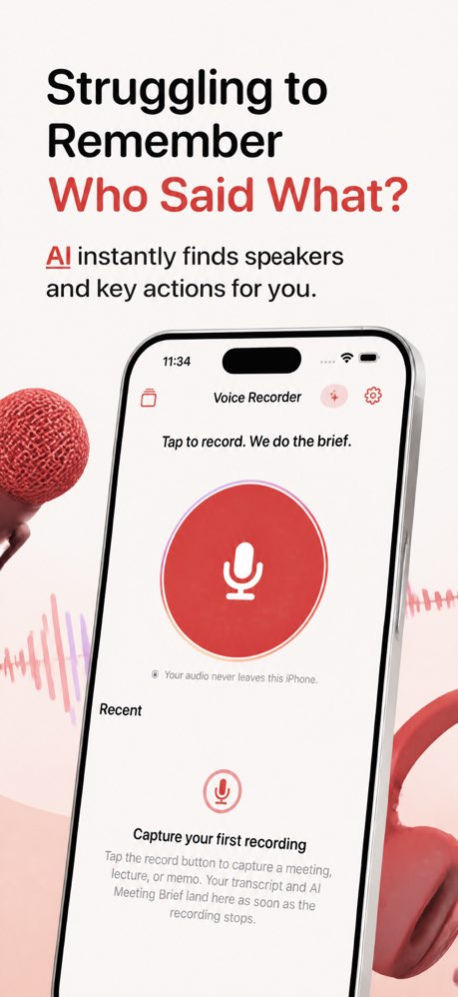


Stop losing key details in meetings, lectures, and voice notes. Record quickly, keep capture going when your screen is off, and come back to a transcript and meeting summary without sorting through messy audio later.
Voice Recorder Audio Memos helps you record audio, transcribe, and review meetings with an on-device AI Meeting Brief.
PERFECT FOR
Use it for work meetings when you need a clean summary with decisions, action items, and chapter markers you can tap to jump to the right moment. Capture lectures and study sessions, then search the transcript for the part you need. Save quick voice memos, interviews, and spoken reminders, pause when interrupted, and pick up where you left off. Import audio you already have, open the latest recording from Siri or Shortcuts, or start a recording from Control Center or a Lock Screen widget when you need to capture something right away.
WHAT'S INSIDE
Tap the giant record button to start in one move, then watch the live meter and Now Recording pill so you always know capture is active. Pause or resume during a session, discard an accidental take with confirmation, and keep recording when the app is in the background or your screen is locked. Recent recordings stay close at hand on the Home screen, and the full library opens in a sheet with folder filters, search, tags, row sharing, and a direct Save to Files action.
Open any recording in the review screen to play it back with a real waveform, drag to scrub, skip back or forward, restart, or change playback speed. Tap transcript lines to seek, search inside the transcript, rename a recording, move it to a folder, add tags, pin bookmark notes to the current moment, trim audio, share the recording, export a brief as a document, or save action items to Reminders or Calendar.
Transcription runs on device and saves for instant reopening later. The AI Meeting Brief also runs on device and can create a short title, a clear summary, decisions, action items, and chapter timestamps. If the brief misses something, you can run it again. When Apple Intelligence is not available, you still get recording, playback, and transcript features.
WHY PEOPLE CHOOSE IT
This app is built for fast capture first, then clear review. You can go from one tap to recording, then from audio to transcript, searchable notes, and a meeting brief on the same iPhone. Your audio stays on your device, and your saved transcripts and briefs reopen quickly without making you wait again.
Some features are available with Pro, including Studio recording, lossless recording, locking recordings with Face ID, and unlimited brief re-runs. Document export has a free daily limit before Pro. Microphone access is needed to record, access is needed for transcripts, and calendar access is only needed if you choose to send action items to Calendar or Reminders.
Record the moment, find the important part fast, and keep every memo easier to review.
Terms of Use (EULA) - http://www.apple.com/legal/itunes/appstore/dev/stdeula
Version History Bug fixes and enhancements 2.3 Aug 21 Bug fixes and enhancements 1.2 Jul 9 Bug fixes and enhancements 1.1 May 15 1.0 04/14/2016
About Voice Recorder Audio Memos
The company that develops Voice Recorder Audio Memos is Sandeep Bhandari. The latest version released by its developer is 2.3.
To install Voice Recorder Audio Memos on your iOS device, just click the green Continue To App button above to start the installation process. The app is listed on our website since 2026-10-13 and was downloaded 3 times. We have already checked if the download link is safe, however for your own protection we recommend that you scan the downloaded app with your antivirus. Your antivirus may detect the Voice Recorder Audio Memos as malware if the download link is broken.
How to install Voice Recorder Audio Memos on your iOS device:
- Click on the Continue To App button on our website. This will redirect you to the App Store.
- Once the Voice Recorder Audio Memos is shown in the iTunes listing of your iOS device, you can start its download and installation. Tap on the GET button to the right of the app to start downloading it.
- If you are not logged-in the iOS appstore app, you'll be prompted for your your Apple ID and/or password.
- After Voice Recorder Audio Memos is downloaded, you'll see an INSTALL button to the right. Tap on it to start the actual installation of the iOS app.
- Once installation is finished you can tap on the OPEN button to start it. Its icon will also be added to your device home screen.
Program Details
System requirements
Download information
Pricing
Version History
version 2.3
posted on 2026-10-13
Version History Bug fixes and enhancements 2.3 Aug 21 Bug fixes and enhancements 1.2 Jul 9 Bug fixes and enhancements 1.1 May 15 1.0 04/14/2016
version 2.3
posted on 2026-09-04
Version History Bug fixes and enhancements 2.3 Aug 21 Bug fixes and enhancements 1.2 Jul 9 Bug fixes and enhancements 1.1 May 15 This app has been updated by Apple to prepare for watchOS 27 compatibility. No new features are included. 1.0 04/14/2016
version 2.3
posted on 2026-08-22
Version History Bug fixes and enhancements 2.3 1d ago Bug fixes and enhancements 1.2 Jul 9 Bug fixes and enhancements 1.1 May 15 This update from Apple will improve the functionality of this app. No new features are included. 1.0 04/14/2016
version 1.2
posted on 2026-07-25
Version History Bug fixes and enhancements 1.2 Jul 9 Bug fixes and enhancements 1.1 May 15 This update from Apple will improve the functionality of this app. No new features are included. 1.0 04/14/2016
version 1.2
posted on 2026-07-09
Version History Bug fixes and enhancements 1.2 32m ago Bug fixes and enhancements 1.1 May 15 This update from Apple will improve the functionality of this app. No new features are included. 1.0 04/14/2016
version 1.1
posted on 2026-06-30
Version History Bug fixes and enhancements 1.1 May 15 This update from Apple will improve the functionality of this app. No new features are included. 1.0 04/14/2016
version -
posted on 2026-04-02
version 1.0
posted on 2016-04-14
Apr 14, 2016
Version 1.0
This app has been updated by Apple to display the Apple Watch app icon.
